How does Urmobo work as an MDM?
All your organization's devices, one point of control

With Urmobo, manage every device in your organization simply and securely from a single platform. Provision, configure, monitor and protect your fleet — whether company-owned equipment or personal devices under BYOD — and keep your business always connected and productive.

Supported platforms

Android ChromeOS iOS iPadOS Windows Linux
Android Enterprise Recommended Android Enterprise Recommended EMM solution, validated by Google
A single console for the whole fleet

From a web dashboard, IT provisions devices, distributes and updates apps and content in bulk, enforces usage policies and reviews the inventory and status of every device in real time. Dashboards and reports show data usage, compliance and devices that have stopped communicating, so you can act before a problem affects operations.

Urmobo management console
One control for every device type

Android and ChromeOS smartphones and tablets, rugged terminals, scanners and production-line devices, kiosks and displays. Dedicated (kiosk) mode, a work profile for BYOD and zero‑touch provisioning to roll out hundreds of ready-to-use devices.
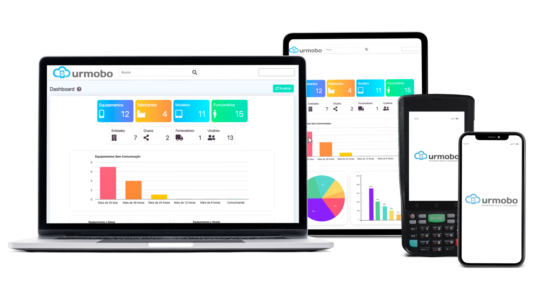
Urmobo across different device types
ODIN AI-powered
Revolutionize mobile device management with the power of ODIN AI

ODIN is more than an advanced virtual assistant. It is AI-powered technology from Urmobo that brings together intelligent resources to run tasks, boost your IT team's overall efficiency and transform the way users interact with your business.

Learn more

ODIN, Urmobo's AI
How Urmobo benefits your company

Save time: configure and update apps and content across many devices at once, from a single central console.

Avoid device loss with continuous inventory tracking and location tracking to find and protect misplaced equipment.

Cut service costs and increase uptime by resolving issues through remote access, without sending a technician on site.

Boost user productivity by blocking games and unauthorized sites through usage policies.
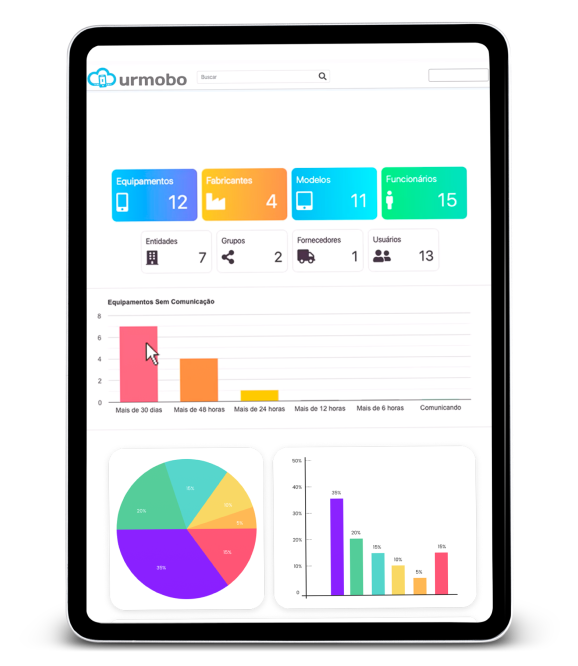
Urmobo control panel
Reseller program

Sell Urmobo and earn the best margins in the market

Add the device management platform companies need today to your portfolio. With Protelecom as your distributor, you sell more, earn more and never sell alone.

Leading marginsCompetitive, predictable commissions on every license.
Recurring revenuePer-device SaaS model: your sales renew.
Protected dealsRegister your opportunities and keep your customer.
Demo & trialsA dedicated environment to show Urmobo to your customers.
Pre-sales supportEngineers who stay with you until the deal closes.
Training & certificationYour team ready to sell and deploy.

Ideal for

VAR resellersMSPsSystem integratorsMobility consultantsDistributorsCarriers

I want to become a reseller

Leave us your details and we'll walk you through the program.

Your data is only used to contact you about the program.

Frequently asked questions
What is MDM?

MDM (Mobile Device Management) is the software an IT team uses to centrally administer phones, tablets and laptops: enrol them, apply configurations and policies, install apps and protect company information, on both corporate and personal devices.

What is EMM?

EMM (Enterprise Mobility Management) broadens the idea of MDM: beyond managing the device, it manages the apps, content and corporate access tied to employee mobility. In practice, MDM and EMM are used today as synonyms.

What is UEM?

UEM (Unified Endpoint Management) unifies the administration and security of every endpoint in the organization — computers, smartphones, tablets and IoT devices — in a single console, with common policies, automation and visibility regardless of the operating system.

What is BYOD?

BYOD (Bring Your Own Device) is the policy that lets employees use their personal equipment for work. It lowers hardware spend and adds user convenience; in exchange, it requires corporate data to be separated and protected through a managed work profile.

How does Urmobo work?

All administration is done from a web console. Devices join the platform through an initial configuration or by installing an agent; from there, IT applies policies, distributes apps and content, and monitors the status of each device remotely.

Which operating systems can it manage?

Android 6 or later with Android Enterprise (and earlier versions, from 4.4, in legacy mode), iOS, iPadOS, ChromeOS, Windows Desktop from version 7, Linux, and Windows Mobile/CE for older data collectors.

What infrastructure does my company need?

Only a device with an internet connection (desktop, laptop or tablet) to reach the console. There are no servers to install or maintain: the platform is cloud-based (SaaS).

How does licensing work?

Licensing is per managed device, on a monthly or annual SaaS basis. The monthly plan has no minimum term and lets you adjust the number of licenses; the annual plan has a 12-month minimum commitment. Urmobo comes in the Dash, FIT, Pro and ADV editions.

Request a free trial

Free trial or proof of concept of Urmobo for your organization. Fill in the form and a Protelecom specialist will contact you.

Do you currently have an MDM in your company? *